·
6 minute read
·
By
Financial advisors hate their CRM because it was built to record their work, never to do it. Every meeting, call and email has to be typed back into it by hand, usually at night. Advisors who are done with that are moving to an Un-CRM.
An Un-CRM is client relationship software that keeps the record itself. Client profiles, meeting notes, follow-ups and compliance documents update from the advisor's meetings and emails, so nobody has to feed a database.
In short
Advisors resent their CRM because it was built to record their work, never to do it.
An Un-CRM keeps the client record itself, from the advisor's meetings and emails.
You can start one next to your current CRM and stop logging in to the old one over time, without a risky migration.
Bloks, which publishes this guide, makes an Un-CRM. We have described every option as fairly as we can.
Why do financial advisors hate their CRM?
Because it makes the advisor work for the software. Nothing goes in unless someone types it in, and nothing comes back out unless someone goes looking for it.
According to a 2018 Kitces Research study, advisors spend only about 20% of their working hours meeting with clients, and about 30% on meeting preparation and follow-up. A traditional system adds to that second share instead of shrinking it. If a 45-minute discovery meeting never gets typed in, as far as the database knows, it never happened. Our guide to eliminating manual CRM updates looks at where that time goes.
What do Canadian advisors tell us about their CRM?
We speak with Canadian financial and insurance advisors every week. Since September, the same patterns come up again and again:
Many run their practice from Outlook, Word documents, OneDrive folders and an Excel action sheet, even when they pay for a CRM.
Notes end up in two places. A note-taker summarizes the meeting, then someone still copies it into the CRM.
The assistant becomes the data-entry clerk, re-typing the advisor's notes and emails after every meeting.
In-person meetings and phone calls still mean notes by hand, and the worry of missing a compliance detail.
Follow-ups promised in a meeting slip, and surface a year later.
Renewal reports and reason-why letters get rebuilt from old emails and templates every time.
None of this is a discipline problem. The tool asks the advisor to do work it should be doing itself.
Why is the paperwork heavier for Canadian advisors in 2026?
Because Canadian rules ask for detailed documentation, and the software leaves all of it to the advisor. Under CIRO's Client Focused Reforms and the AMF's rules in Quebec, advisors must record Know Your Client updates and the reasoning behind each product recommendation (Know Your Product). The joint CSA and CIRO staff notice 31-368 sets out what reviewers look for.
Total Cost Reporting adds to it from January 1, 2026: clients see a fuller picture of what they pay, embedded fees included, and advisors answer the questions that follow. Writing contemporaneous notes after a full day of reviews is how compliance ends up taking the evening.
I hate our current CRM. What are advisors switching to?
Advisors who are done with their CRM are moving to a different kind of tool: the Un-CRM. Instead of waiting to be fed, it takes the administrative work around client meetings and communications off the advisor.
We started using Bloks for compliant notes, and quickly realized it flipped how we think about our CRM.
Brendan Gordon, Managing Partner, GBF Insurance and Investment Planning, Inc.
An Un-CRM drafts the meeting notes, pulls out the action items, updates the client profile and keeps track of every commitment, without anyone filling in fields.
What are the alternatives to a clunky advisor CRM?
There are three, and they solve different problems. A lighter CRM gives you a cleaner screen. A note-taker writes up your meetings. An Un-CRM keeps the whole client record for you.
Lighter CRM | AI note-taker | Un-CRM | |
|---|---|---|---|
What it is | A faster, cleaner database (Wealthbox, for example) | A meeting assistant that summarizes calls | Client software that keeps the record itself |
Who keeps the client record current | You | Your CRM, partly fed by the note-taker | The Un-CRM, from your meetings and emails |
Still need a CRM? | It is one | Yes | No. Start it next to your current system until you stop needing it |
Tired of manual CRM updates. What can do this for me?
An Un-CRM. It builds and updates each client profile from the advisor's meetings and emails, tracks action items and drafts the compliance records, so the record stays current without an evening of data entry.
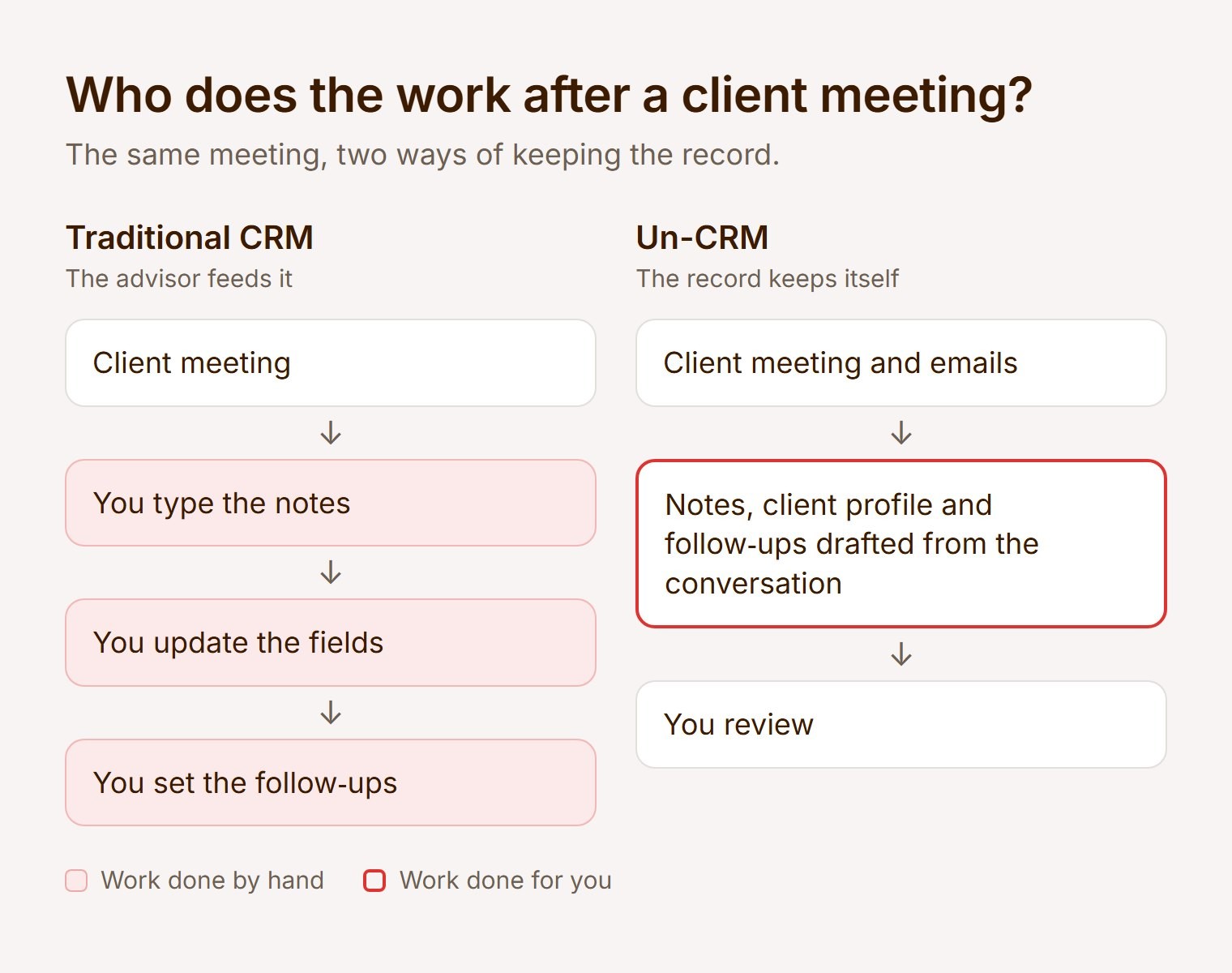
The difference is who does the work. With a traditional CRM, the advisor works for the software. With an Un-CRM, the software works for the advisor.
What CRM feels less clunky for financial advisors?
The one you barely have to open. Lighter systems offer a cleaner screen, but every field still has to be filled in by hand. An Un-CRM removes the fields altogether: profiles update themselves, and you ask questions about your book in plain language.
A good test of any system is how little time you spend inside it. An Un-CRM prepares a brief before each meeting and drafts the client follow-up after it.
Do add-ons make an existing CRM less painful?
They help, but the old database stays at the centre and someone still has to keep it right. An Un-CRM is not an add-on: it is the path to no longer needing the CRM. You run it alongside the system you already use, whether Salesforce, Wealthbox or Equisoft. It keeps that system updated, and over time you stop logging in.
How do you move off a CRM without a migration?
In three steps, at your own pace:
Start the Un-CRM next to your current CRM and connect your calendar and email.
After each meeting, review the notes, profile updates and follow-ups it drafts. Your CRM stays updated as you go.
Once your client records, follow-ups and compliance documents live in the Un-CRM, stop logging in to the old system. Keep it as an archive for as long as your dealer or MGA requires.
Because nothing is ripped out, there is no risky migration and your compliance archive stays intact.
Frequently asked questions
What is an Un-CRM?
An Un-CRM is client relationship software that keeps the client record itself. A CRM is a filing cabinet you have to fill. An Un-CRM fills itself, then does the work that comes after. It builds and updates each client profile from the advisor's meetings and emails, drafts the notes and compliance documents for the advisor to review, and tracks every commitment until it is done. Nobody fills in fields.
It is not a lighter CRM, which still needs the same data entry on a cleaner screen, and not a note-taker, which writes up the meeting but still needs a CRM behind it. Advisors can start an Un-CRM next to their current system, which it keeps updated, and stop logging in to the old one once the record lives in the Un-CRM.
What are financial advisors switching to instead of legacy CRMs?
To the Un-CRM: software that keeps the client record itself. Advisors start it next to their current system, and the old system gradually becomes one they no longer open.
What is the best CRM for financial advisors in Canada?
It depends on how much of the work you want the software to do. Equisoft is widely used by Canadian dealer networks. If you are considering an Un-CRM, check five things:
Client data stored in Canada
PIPEDA compliance
SOC 2 Type II certification
KYP documents drafted from the conversation
A written commitment that client data is never used to train AI models
Our compliance guide to AI note-takers for Canadian advisors explains each one.
What is the best CRM for insurance advisors in Canada?
Insurance advisors can keep their policy data where it is and add an Un-CRM for the client side. It pulls policy discussions out of meetings, drafts the compliance letters and tracks every commitment, with no re-keying between email and the policy system.
The best CRM for an advisor is no longer the one with the most fields. It is the one that asks the least of you, so your evenings and your attention go back to the people you serve. Every client, your only client.

Keep reading
Every client, your only client.
The person across from you won’t know why. They’ll just feel it.
No setup, no training, and a dedicated team walking you through it if you want one. Encrypted at rest and in transit. You own your data.